Monday, April 5, 2010

11 Ways To Improve Your Blog's Alexa Rank


What is alexa ?


Alexa is a California based subsidiary company of Amazon.com that is known for its toolbar and website.Its gives its alexa rank to every site according to amount of users who've visited a website with alexa toolbar installed.


What is alexa rank ?


The Alexa Rank is a ranking system which bases its ranking schema on the level of traffic each website receives from the number of users who visits a website with the Alexa toolbar installed on their browser.


Why would you want to increase your Alexa rank?


Importance of alexa rank >>

  • An advertiser will first have a look on your Alexa rank to understand your blog capacity and Statistics, So if you have a bad alexa ranking, better they’ll choose some other places for keeping their ads. This is one of the main importance of alexa rank.
  • If you want to sell ad space of your website through services like Text-Link-Ads and other services like that, you need a better Alexa Rankings & Google PageRank.
  • If you are writing sponsored articles for sites like reviewme, sponsoredreviews, payperpost then alexa ranking is a must need factor for getting higher amounts for writing paid reviews.

100% Proved Way To Improve Your Alexa Ranking :

1. Install Alexa toolbar : It is not only used for Easy Alexa Lookup, but also for improving your Website Alexa Rank.Yeah, Whenever any user visit a WebPage with Alexa Toolbar Installed Browser, They are giving an UP RANK for that website. Means... You can easily Improve your Blog Alexa Rank with this Toolbar. 
Grab Alexa Toolbar For My Browser

2. Put alexa rank widget or other widgets to your website : This method improve your website traffic and giving boost to your alexa rank. I installed alexa widget to my blog one week ago and my alexa rank boost from 3,55,525 to 1,780,569. Drastic improvement in alexa rank...!! It is great way to improve your rank and traffic.

3. Get friends or other user to review and rate : your Alexa website profile mean something write about your site and rating you. This will make your website popular and it indirectly increase your alexa rank.

4. Encourage users to use or installed the Alexa toolbar : The users may include your friends,blog readers. With installed toolbar,they surf your website,it will boost to your alexa rank.And be sure to write about alexa and its toolbar,so users know why they are installing Alexa’s toolbar. 

5. Installed alexa toolbar to all school/home/office computers : installing all toolbar to all computers of school/college/office gives great and fast way to improve your blog rank and set your blog or website to homepage. 

6. Write something about alexa : Webmaster/bloggers are interested to know about ways to increase their Alexa rank. They’ll link to you and send you targeted traffic (i.e. visitors with the toolbar already installed). This gradually has effects on your Alexa ranking.

7. Use Dugg or Stumbled : This usually brings huge numbers of visitors to your website/blog and the sheer amount will have a positive impact on your Alexa Rank.


8. Make an Alexa category : create a separate categories for alexa on your blog and use it to include any articles or news about Alexa. This acts as an easily accessible resource for webmasters or casual search visitors while helping you rank in the search engines.


9. Make friendship with cybercafe owner : To install the Alexa toolbar to cyber's PC and set your website as the homepage for all their computers. Great way..!!


10. Create pages or groups in facebook : Create your own page/group and invite your friend to join and and try to make more members to your page,will also increase your traffic. 


Create Your Facebook Page


11. Try Alexa auto-surfs : Is this really work for me? This software can may be work for newly created websites with a very poor Alexa rank. 


Note that there be problems when you try to use auto surfs alongside contextual ads like Adsense. They aren’t also long term solutions to improving your Alexa Rank so I suggest using with caution,at your own risk.


If you have some confusion or questions regarding the article then simply comment.


Happy to see you.
read more...

Sunday, April 4, 2010

Amazing Free Blogger Templates Site : Check This List


Generally, new blogger when they start their blogging.Their lots of time are wasted or used by searching for new templates which matches to their content at the same time it look very attractive. Its true!!


So this article is for blogger who are looking for their new blog template. 


When I was created my new blog...I tried very hard to get the best templates for my blog..everyone want the best,and because of this I am very well known about the site which offers the best and fully-featured templates.


Here some free blogger templates list :-

  1. Btemplates
  2. Blogger-dashboardblogpsot
  3. Bloggertemplatesfree
  4. Dobeweb
  5. Instantshift
  6. Eblogtemplates
  7. Bloggertemplatesblogspot
  8. Pyzam
  9. Bietemplates
  10. Skinpress
  11. Cooltricksntips
  12. Blogandweb
  13. Premiumblogthemesblogspot
  14. Mashable
  15. Anewmorning
  16. Bloggerbuster
  17. Blogtemplate4u

This list are created by me so their can many website which offers elegant blogspot templates.If you know about site,then please comment and let me know about it. It will also helpful for new blogger.


Happy blogging !!


read more...

Wednesday, March 31, 2010

SocialAddict Brings Social Networking Site To Your Desktop


Generally, We blogger tries to constantly market our blog through various social networks like twitter,facebook and all, I am often frustrated by having to open so many tabs or go to so my social networking site just to update my status.


So, We want some better option or solution for this and this solution not only useful for blogger as well as for other people.


The Solution is SocialAddict - is a new desktop application that allows you to update several social networking sites from the comfort of your desktop.


Several social networking site involves in this applications:

  1. BrightKite
  2. Facebook
  3. FriendFeed 
  4. Hellotxt
  5. Jaiku
  6. MySpace
  7. Ping.fm
  8. Plurk
  9. SocialThing
  10. and Twitter


read more...

Monday, March 29, 2010

Share Your Files Free In Twitter With Twitfile


TwitFile.com lets easily you share files on Twitter, and these can amount to as much as 200 MB per file for completely free. This means that you will be capable of putting any file you might want to share with others in real time, and letting others procure them no matter where they are located.


How to use twitfile??

Their are three simple steps >>

1. Click here to go to www.twitfile.com
2. Then simply,enter your twitter username and password.
3. Twitt something and browse file to upload or share,after browsed finished,below uploading notification come.Let them finished first then click on post. 
You done..!! Now your posted file will be sharable on twitter.

Happy Twitting..!!

read more...

Sunday, March 28, 2010

Schedule Facebook Status Updates With Sendible[Simply The Best]


In my previous post I write about facebook to Get Your Custom Facebook URL In this post I write something which you find interesting and useful also.

Start with one question...

Do you like to keep your Facebook profile active or you are addicted to facebook ?, but may be offline for a few days?  Maybe you’re taking a trip or busy in some work and won’t be anywhere near a computer for a week. 

So because of this,you couldn't update your status.
No worry man.You can accomplish your wishes by using Sendible to schedule your Facebook status updates.


Happy...!! Even I am very happy to share with you.


But for Facebook specifically, once you sign up with Sendible, just hit on Facebook and give your Facebook login details. Sendible redirect directly with your Facebook account. The, under “New Messages” click on “Status Updates“.

facebook status fun
On the next page after this you can schedule out as many updates as you’d want to! This service is fantastic  and every facebook user have to  try this once.

It just provide service to facebook user??
Then the answer is no. 
You can distribute scheduled updates to a number of social networks including MySpace, Blogger, Twitter and more.

Actually, I like facebook very much.So I always try for this stuff specially related to facebook. 

Hope you like my post.
read more...

Saturday, March 27, 2010

Get Your Custom Facebook URL [Your Name In Facebook URL]

We are quite familiar with twitter,so we have seen that twitter uses our username in twitter URL so it is easy to reach to any people with this url like www.twitter.com/viru12 and also we can see anyone twitter account without login.


So WHY NOT IN FACEBOOK >>
We can also use our unique username in facebookURL.
In facebook,suppose I want to search my friends aatif then I have to find out my friends name aatif from the long list which facebook shown to me or I have to call my friends to get his email address to find him.


So this is great method to unique identify someone fastly.


Click Here >> www.facebook.com/username
read more...

Friday, March 26, 2010

Hide Your Folder Or File With Command Prompt[Without Software]

This is very simple and small method to hide your data in windows.Just go through it. 


1. First creat a testing folder in C and name it as 'test' the Go to Start, Run and then type in CMD to open the command prompt window
hidden folder
2. Now navigate to the parent folder of the folder you want to hide.
>>   Means,Change the address of the command prompt to the parent folder of the folder which you want to hide.In this example we change our address to C:\ This can be done by the CD command.                       
type   CD C:\
>>  If you want to hide a file,navigate to the folder where the file is located.and 
CD C:\Foldername
3. Now all is set,So just type the following command in command prompt, replacing the word filename with the name of the file you want to hide.
attrib filename +s +h
And that’s it! Your file or folder is now completely hidden! 
  1. It won’t show up in MyComputer, 
  2. It won’t show up if you browse via the command prompt and 
  3. It won’t even show up if you select “Show all Hidden Files and Folders”.
If you want to un-hide the folder you simple follow the same steps, now you’ll run the following command to make the folder to show:
attrib filename -s -h
You can use this command for both files and for folders. In our example, if I wanted to hide C:\Test, I would go one level above to C:\ and then type in attrib Test +s +h.
hide files
You’ll definitely need to remember which folders or files you have hidden as there is no easy way of determining what’s missing, so make sure you remember what you hide!
read more...

Friday, March 19, 2010

Attractive Animated "Read More" Buttons For Blogger With Stylish Arrow Nose!


Animated Read More Buttons           If a picture says a thousand words than it would not be objectionable to say that an animated image would speak a million words.


>>So many blogger are trying make his/her blog attractive.And animation is one of the way to present your blog to the audience or user. 


>>Its time to get rid of the Read More or Continue Reading Text and replace it with a cool, stylish and most importantly with an animated Read More Button. Give it an Arrow Nose!

Below is an example of an in-motion Read More Button with an animated arrow nose,
grey
green


Download Read More Button From Here
read more...

Thursday, March 18, 2010

Related Post With Thumbnail Under Each Post And Increase Pageviews


Add related post with thumbnail.Look great and attractive 


LinkWithin is a blog widget that appears under each post, linking to related post your blog archive.This Gadgets index all stories from your blog archive, not just recent stories, making them accessible to new or casual readers of your blog who would not otherwise encounter them.Increase Pageviews, Keep Readers Engaged,The widget links to stories that are relevant and interesting to readers of a particular post, keeping them engaged with your blog, and increasing your traffic.
The widget is free and ad-free. It takes a minute to get the widget up and running on your blog, no signup required!

Get this Widgets
read more...

Animated Recent Post Blogger Widget


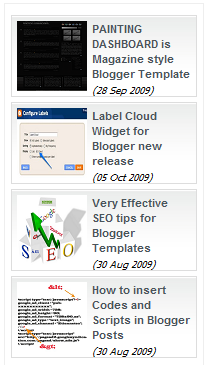
           This post is for let you know about the animated recent post widget,which look great when you add this on your blog.You can see the static image of it,which include name, thumbnail image, and date of post.And it look very attractive during runtime.

For bloggers you need to put the widget into the Sidebar Gadget (add gadget), copy all html below to that gadget:
1. Log in your blogger account
2.Go to Layout
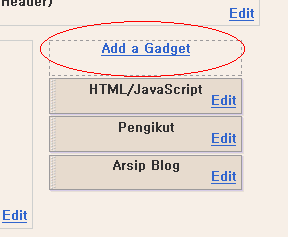
3.Click on Sidebar Add a Gadget
4.Click on HTML/JavaScript
5.Now copy this code and paste in this page .


<script src="http://ajax.googleapis.com/ajax/libs/jquery/1.3.2/jquery.min.js" type="text/javascript"></script>
<style type="text/css" media="screen">
<!--
#spylist {
overflow:hidden;
margin-top:5px;
padding:0px 0px;
height:350px;
}
#spylist ul{
width:220px;
overflow:hidden;
list-style-type: none;
padding: 0px 0px;
margin:0px 0px;
}
#spylist li {
width:208px;
padding: 5px 5px;
margin:0px 0px 5px 0px;
list-style-type:none;
float:none;
height:70px;
overflow: hidden;
background:#fff url(http://dl.getdropbox.com/u/708209/scriptabufarhan/recentspy/post.jpg) repeat-x;
border:1px solid #ddd;
}


#spylist li a {
text-decoration:none;
color:#4B545B;
font-size:11px;
height:18px;
overflow:hidden;
margin:0px 0px;
padding:0px 0px 2px 0px;
}
#spylist li img {
float:left;
margin-right:5px;
background:#EFEFEF;
border:0;
}
.spydate{
overflow:hidden;
font-size:10px;
color:#0284C2;
padding:2px 0px;
margin:1px 0px 0px 0px;
height:15px;
font-family:Tahoma,Arial,verdana, sans-serif;
}


.spycomment{
overflow:hidden;
font-family:Tahoma,Arial,verdana, sans-serif;
font-size:10px;
color:#262B2F;
padding:0px 0px;
margin:0px 0px;
}


-->
</style>


<script language='JavaScript'>


imgr = new Array();


imgr[0] = "http://i43.tinypic.com/orpg0m.jpg";


imgr[1] = "http://i43.tinypic.com/orpg0m.jpg";


imgr[2] = "http://i43.tinypic.com/orpg0m.jpg";


imgr[3] = "http://i43.tinypic.com/orpg0m.jpg";


imgr[4] = "http://i43.tinypic.com/orpg0m.jpg";
showRandomImg = true;


boxwidth = 255;


cellspacing = 6;


borderColor = "#232c35";


bgTD = "#000000";


thumbwidth = 70;


thumbheight = 70;


fntsize = 12;


acolor = "#666";


aBold = true;


icon = " ";


text = "comments";


showPostDate = true;


summaryPost = 40;


summaryFontsize = 10;


summaryColor = "#666";


icon2 = " ";


numposts = 10;


home_page = "http://www.latestbloggertricks.com/";


limitspy=4
intervalspy=4000


</script>


<div id="spylist">
<script src='http://dl.getdropbox.com/u/708209/scriptabufarhan/recentspy/recentpostthumbspy-min.js' type='text/javascript'></script>
</div> 


6.Replace "www.latestbloggertricks.com" in your blog name.
7. Click on Save and that's it.

read more...