Showing posts with label Blogging Tools. Show all posts

Thursday, September 9, 2010

Make Your First Letter Big In Blog Post


See full size image
Often, You might have seen in newspapers or even in some blog posts that there are paragraphs in which the first letter of the first word of the first line is bigger in size as compared to the rest of the letters.This looks nice to see and many blogger uses this tricks. So this post helps you to implement this tricks.

You can also do the same thing in your blog posts—simply by Adding some CSS to your html code.Your post’s first letter (character) would become bigger than original font sizes.


Now, you might have a question–How to do this? 


Well, to implement this in your blog, all you need to do is to follow some steps which includes adding some CSS code in your html code, and you will have the first letter of your blog post bigger in size. Below picture shown you is the result of this tutorial.
Make First Letter Big in Size for Blog

Steps to make first letter big in your blog post are :-


  • Log in to your blogger account
  • On your dashboard, click on Layout (see the image below.)

Select   Blogger Layout

  • Now, click on Edit HTML to add code to templates (see the image below.)

Edit HTML


  • Then find the code]]></b:skin>and add following code above it 


.post-body:first-letter {
float:left;
color: #000000;
background:#ffffff;
line-height:80px;
padding-top:1px;
padding-right:5px;
font-family:times;
font-size:100px;
}


  • Save your templates and you finished with this.


read more...

Tuesday, April 6, 2010

How to Import Your Blog to Your Facebook Page


Generally, A blogger needs a wide platform which spread their important article to webuser. So this useful and important article should be available to their right audience. And we all are familiar with the popularity of facebook. How to use this platform effectively..??, their is one way...Feed your blog posts right to your Facebook page.
Here’s how:
Step 1: In the “Account” dropdown on the top-right menu bar, click “Application Settings”. This will bring up a page with a list of your applications.
Step 2: On the resulting page, click “Notes”. Don’t click on “Edit Settings” or “Profile”. Just click the word “Notes”.
fb-step12
Step 3: The following page will bring up your current notes or state that you don’t have any. On the right side of the page is a box where you will click on “Import a blog”.
fb-step3
Steps 4: On the next page, enter the URL for your blog’s feed. Then click the checkbox to accept Facebook’s terms (basically saying that you’re entering your own blog), and hit “Start Importing”.
fb-steps4-6
Important: Facebook is often glitchy at this step.  If you get an error, and you’re sure you’ve entered the right URL, keep trying. You might even have to close out of the process and go back in, but eventually it will work. (Hopefully Facebook is working on this.)


Note: If your entire site is a blog (rather than a page on your site), you can enter the primary URL here too. In other words, we could enter “http://feeds.feedburner.com/InfoSectors” or just “http://www.infosectors.com”.
Step 5: If all goes well with the URL you entered, you’ll be taken to a page showing a preview of your blog posts. Don’t worry that they’re not in order here. It’s because they all show as being loaded on the same day.From this point forward, new posts will show up at the top as you post them. If all looks good, click “Confirm Import”.
fb-step7
Once you’ve confirmed your import, you can view the feed in the “My Notes” tab. That’s it! Your blog posts will now update your Notes page in your Facebook account automatically.
fb-mynotes
If you have a Fan Page
You can easily accomplish the same thing on your Facebook Fan Page. Everything is the same as a regular Facebook page, except the first step. On your settings page, where all your settings are listed, click “Edit” under “Notes”. From there, everything looks the same as above.
fb-fanpagefeed

read more...

Blogging Useful Tools [Start Blogging Smartly]


In my previous article I post about essential free templates websites for blogger,this something bloggers need. So in this section also I posted about various tools available for blogger, which makes your blogging easier and fast. This tools will help you in some way.
And we are blogger, So we should know about this available useful tools. I hope you'll like this, even I am very excited to write something useful things for my blogger friends. 

     Post from anywhere!

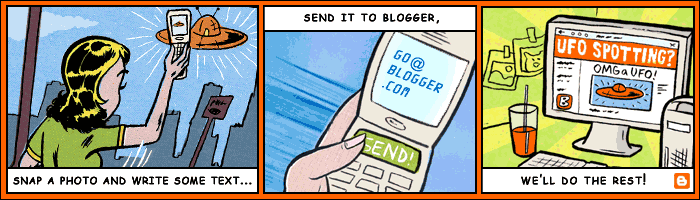
Using  Blogger Mobile  is easy: Snap a photo and write some text on your mobile phone, send it to  go@blogger.com , and it gets posted to your mobile blog!

  • When you send texts to BLOGGR (256447) or photos to go@blogger.com from your mobile device they're automatically posted to your new blog.
    Blogger Mobile
     lets you send photos and text straight to your blog while you're on-the-go.


  • Mail-to-Blogger: Post your article via email..?? Yes, you can also post to your Blogger blog via email.This feature is inbuilt to your blogger.So it is easy as well as healthy to use and post.

  • BlogThis! BookmarkletBlogThis! is an easy way to make a blog post without visiting blogger.com. Install this nifty bookmarklet in your browser, and you can post with just one click.Isn't this useful..??

  • Blogger in DraftBlogger in draft is a special version of Blogger where we try out new features before releasing them to everyone. Think of it as our sandbox, or laboratory, or just “Blogger + new things.” By taking your feedback and looking at what works and what doesn’t, we’ll be able to make features that much better when releasing them to everyone.

  • Blog via Flickr: You can post your Flickr photos directly to your blog, and can even post directly from your camera phone (great for those whose mobile phone network is not covered by Blogger Mobile)

  • Haloscan: By default, Blogger doesn’t allow you to send trackbacks when you post. By using the free service from Haloscan, you can send trackbacks to other blogs, and also display the trackbacks which have been sent to you. Other free features for Blogger users include external commenting and ratings systems for your blog posts.

  • w.Bloggar: a free Windows based application which you can integrate with your Blogger blog to post remotely. One version allows you to install on a pen drive to post while you are away from home.

  • Blogger for Word: This something great..!! Using this free download, you can publish your post to blog, save drafts and edit posts from within Microsoft Word.

  • Blogger Developers Network: Information for developers interested in creating applications, templates and widgets for the Blogger framework.

This is general info about this tools,it just gives you small descriptions about the tools and if you have something to say then post comments below. I hope...,this post liked you and will be useful.
read more...